

Published: · Updated:
WABCO Air Dryer: System Saver 1200 ID and Parts
How to identify a WABCO System Saver 1200 air dryer, how its purge cycle works, which parts wear, and how to match cartridge, heater and dryer replacements.
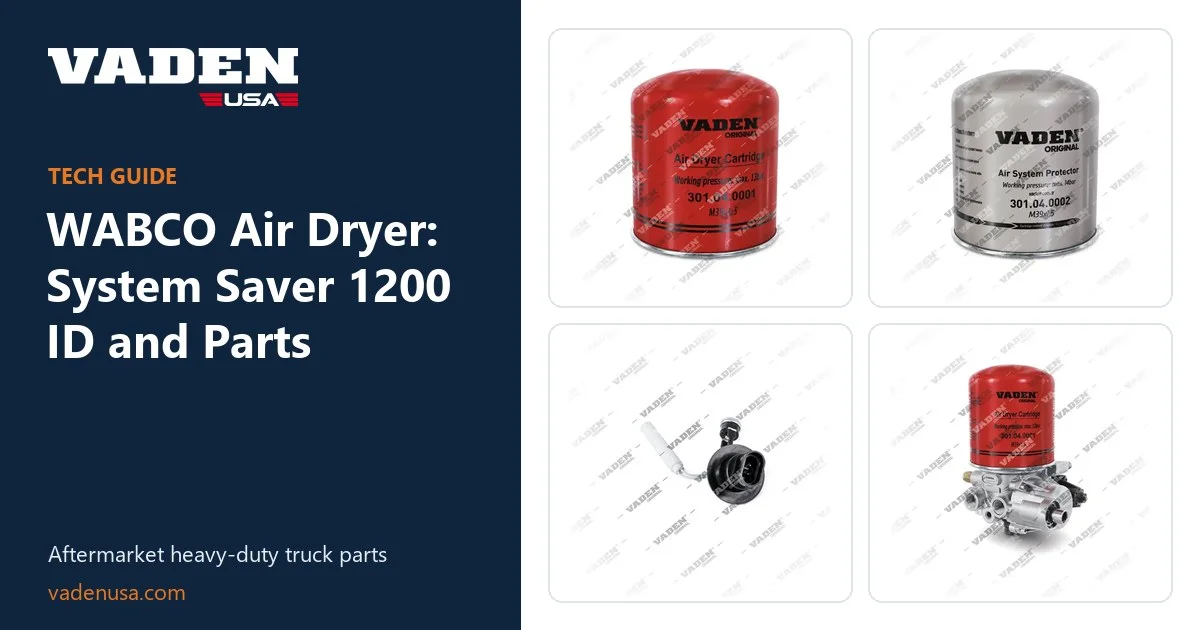
A WABCO air dryer, such as the System Saver 1200, removes water and oil vapor from the compressed air that leaves the compressor. It does this with a desiccant cartridge and a purge cycle that dries the cartridge again, so moisture does not reach valves, tanks and brake chambers. Identify the exact variant from its data plate before ordering parts.
What the System Saver 1200 does
The System Saver 1200 family, also called the WABCO 1200 air dryer or SS1200 for short, is a single-cartridge air dryer sold under the WABCO name (now part of ZF). It sits between the compressor and the first air tank. Hot, wet air from the compressor enters the dryer, cools, and drops liquid water and oil droplets into a sump. The air then passes through a desiccant bed that pulls out water vapor before it continues to the tanks.
Because the desiccant slowly saturates, the dryer needs a regeneration (purge) cycle. When the governor unloads the compressor, a purge valve opens, a small amount of dry air flows back through the desiccant, and the collected moisture is expelled out of the exhaust. That is the short burst of air you hear under the truck after the compressor stops pumping.
For the broader picture of how dryers fit into the brake system, see our truck air dryer guide.
How to identify a WABCO air dryer
"WABCO air dryer" covers several designs, so never order from the name alone. Use this sequence.
- Find the data plate or label on the dryer body or end cover and write down the full WABCO part number. WABCO numbers are written as ten digits, for example 4324130010.
- Note the family name on the housing or in the maintenance manual, such as System Saver 1200, 1200 Plus or 1800.
- Check the variant letter. Manufacturer literature lists single-cartridge versions such as the 1200E, 1200P, 1200U and 1200 Plus. Confirm which one you have in the manual for your dryer.
- Look at how the purge is handled. Some variants use a regeneration valve on the dryer, while P-style versions are plumbed to a dedicated purge tank. Check the manual for your variant.
- Check whether the dryer has an electrical connection for a heater (confirm in the manual for your variant).
- Record the truck or trailer make, model and year in case the supplier needs to confirm fitment.
The following table shows what each identification clue tells you.
| Clue | What it tells you | Why it matters when ordering |
|---|---|---|
| Ten-digit WABCO number on the data plate | Exact dryer assembly | Best starting point for any cross-reference |
| Variant letter (E, P, U, Plus) | Purge arrangement and options | Purge valve and regeneration parts can differ between variants |
| Purge tank connected to the dryer | P-style dryer | Do not substitute a standard model without checking the plumbing |
| Electrical connection on the dryer | Possible heater circuit | Confirm in the manual whether a heater element is fitted; it is a separate service part |
| Port layout and mounting | Physical interchange | A dryer that does not match the ports and bracket will not install |
If you have a part number and want to find the matching aftermarket item, our guide on how to cross-reference an OE part number walks through the process, and the WABCO cross reference to VADEN part numbers lists common matches.
The purge cycle step by step
Understanding the cycle makes diagnosis much easier, because most dryer complaints show up as a purge that is too short, too long, or missing. In simple terms, the cycle runs like this. The exact plumbing differs by variant.
- The compressor loads and pumps air into the dryer. Water and oil collect in the sump while vapor is adsorbed by the desiccant.
- Tank pressure reaches the governor cut-out pressure and the governor unloads the compressor.
- The unloading signal causes the purge valve to open. The sump contents are blown out through the exhaust.
- A small flow of dry air passes back through the cartridge and carries moisture out of the desiccant.
- The purge valve closes and the dryer waits for the compressor to load again.
ZF/WABCO troubleshooting literature for the System Saver 1200 Plus (publication TP-1033) lists, for water in the tanks, verifying at least 10 seconds of air flow from the purge valve after the purge. Other variants may differ, so check your manual.
The governor matters here because it controls when the compressor unloads. If the unloader side or the governor misbehaves, the dryer can look faulty when it is not. Our air governor guide covers that side, and the air dryer purge valve article goes deeper on the valve itself.
Symptoms and what to check
What fails depends on the variant and the duty cycle, so treat this as a symptom guide rather than a fixed schedule. The manufacturer's service literature is the authority for intervals and torque values on your specific model.
| Symptom | Likely area | First check |
|---|---|---|
| Water in the air tanks or at the drain valves | Saturated cartridge, short purge, or frozen or inoperative heater | Drain a tank and look at the water; check purge duration |
| Oil in the tanks or on the cartridge | Compressor passing oil | Test the compressor before replacing the dryer |
| Dryer purges but never seems to regenerate | Purge valve not closing, or a check valve problem between dryer and tank | Inspect the purge valve and the check valve path |
| Constant air leak at the exhaust | Purge valve seals or valve contamination | Listen with the compressor loaded and unloaded |
| Slow pressure build-up | Contaminated desiccant or restricted inlet | Compare build-up time with a known good unit |
| Frozen exhaust or purge in cold weather | Heater element or heater wiring | Check heater power and resistance per the manual |
Check valve condition between the dryer and the supply tank can affect regeneration; follow the manual for your variant.
Oil is a special case. A desiccant cartridge is not designed to absorb liquid oil, and oil carry-over shortens its life quickly. If you find oil, check the compressor first using our guide on how to test a truck air compressor, then replace the cartridge. Replacing a cartridge on an oil-pumping compressor only repeats the failure.
Replacing the cartridge and heater
The exact procedure, tightening values and sealing details are in the manufacturer's maintenance manual for your variant, and you should follow that document. The general sequence below is only an outline.
- Park the truck, chock the wheels and drain all air from the system.
- Disconnect electrical power to the dryer heater if the dryer has one.
- Remove the old cartridge and check the sealing surface for damage.
- Prepare the new seal as the manufacturer directs and install the cartridge, tightening to the manufacturer's specification.
- Reconnect the heater power, build system pressure and check for leaks at the cartridge and exhaust.
- Watch one full purge cycle and confirm the air flow after the purge is long enough.
The heater is a separate element. Test the heater circuit with the procedure in the manufacturer's manual before you replace it. If you are unsure how often the cartridge itself should be changed, see air dryer cartridge replacement intervals.
WABCO and Bendix dryers: do not assume interchange
People often ask whether a WABCO dryer is the same as a Bendix AD-IP, or whether the cartridges swap. The designs differ, the housings differ and the cartridge threads and seals are not guaranteed to match. Treat each brand as its own family and match by part number and physical dimensions. Our article on Bendix AD-9, AD-IS and AD-IP explains the Bendix side. If your truck has an air processing unit that combines dryer and valves, read air dryer vs air processing unit before ordering.
VADEN parts for WABCO-style dryers
VADEN lists cartridges, heaters and complete air dryers in these categories: air dryer cartridges, air dryers and heaters. VADEN also has a repair kit category. The table below shows items that reference WABCO or Meritor numbers. Confirm the fit of any item against your dryer's data plate, because a reference number is not a model coverage list. VADEN parts are aftermarket replacements, and WABCO, Meritor and other names are used only to identify the part being replaced.
| VADEN part | Description | Replaces / fits |
|---|---|---|
| VADEN 301.04.0001 | Air Dryer Cartridge, Replaces WABCO 4324100202 | Daewoo 3454402330, DAF 0699387 |
| VADEN 301.04.0002 | Air Dryer Cartridge, Replaces Meritor R950068 | Alexander Dennis 660724, DAF 0699387 |
| VADEN 301.02.0103.20 | Air Dryer Heater, Replaces WABCO 8942600462 | Wabco 8942600462 |
| VADEN 301.02.0104 | Air Dryer, Replaces WABCO 4324130010 | Wabco 4324130010 |
| VADEN 301.02.0127 | Air Dryer, Replaces WABCO 4324801450 | Wabco 4324801450, Wabco 4324803410 |
Sources and further reading
For purge timing and troubleshooting, use the manufacturer's literature, such as ZF's TP-1033 troubleshooting publication, together with the maintenance manual for your variant. Also check the tank drain method: see air tank drain valve guide.
FAQ
What is a WABCO System Saver 1200 air dryer?
It is a single-cartridge air dryer that removes moisture and oil vapor from compressor air using a desiccant cartridge and a purge cycle. It mounts between the compressor and the first air tank.
Is a WABCO air dryer the same as a Bendix AD-IP?
No. They are separate designs from different manufacturers. Do not assume that cartridges, purge valves or mounting hardware interchange. Match by part number and by physical comparison.
What does a WABCO air dryer diagram show?
A typical diagram shows the inlet from the compressor, the sump, the desiccant bed, the outlet to the tank, the purge valve with exhaust, and on some variants a regeneration valve or purge tank. Use the diagram in the maintenance manual for your exact variant.
How do I find the part number on my WABCO air dryer?
Look for the data plate or label on the dryer body or end cover. The WABCO number usually has ten digits. Photograph it before you contact a supplier.
How do I replace a WABCO air dryer cartridge?
Drain the air system, remove the old cartridge, inspect the sealing surface and install the new one as directed by the maintenance manual for your variant, using the manufacturer's tightening specification. Then build pressure, check for leaks and watch a full purge cycle. See the outline above and the cartridge interval article for timing.
Does the WABCO air dryer have a purge valve?
Yes. The dryer uses a purge valve that opens when the compressor unloads so collected water and contaminants leave through the exhaust. The arrangement varies by variant, so follow your manual, and see our air dryer purge valve article for more.
Need a cartridge, heater or dryer for a WABCO-equipped truck or trailer? Send the data plate number and truck details to info@vadenusa.com or use our contact page to confirm fitment, request a quote or open an account.
Blog
3 2026-11-19
Air Brake Troubleshooting Guide: Symptoms, Causes, Fixes
Symptom-by-symptom air brake troubleshooting for semi trucks: slow build-up, pressure loss, constant dryer purge, locked brakes and ABS faults, with first checks.
 2026-11-19
Trailer ABS Light: Causes, Reset and DOT Violation Rules
Why the ABS light stays on a semi trailer, what the power-up check should look like, common causes, blink codes, resetting and what DOT rules say.
 2026-11-19
WABCO Air Compressor: ID, Rebuild Kits and Replacement
How to identify a WABCO air brake compressor by its 10-digit number, tell single from twin cylinder, and decide between a repair kit and a replacement unit.